Revive Score Calculator
Total your final Revive score from artifacts, tribe board technology, machine card slots, population regions, progress, tokens, and leftover resources.
⚙Score Presets
🏛Main Score Inputs
Enter the points already scored before purple end scoring begins.
Use the visible VP space left open by progress markers.
Reference count for tribe ability and machine unlock progress.
Add purple points printed on unlocked technologies.
🗺Population and Regions
🃏Machine Slots and Cards
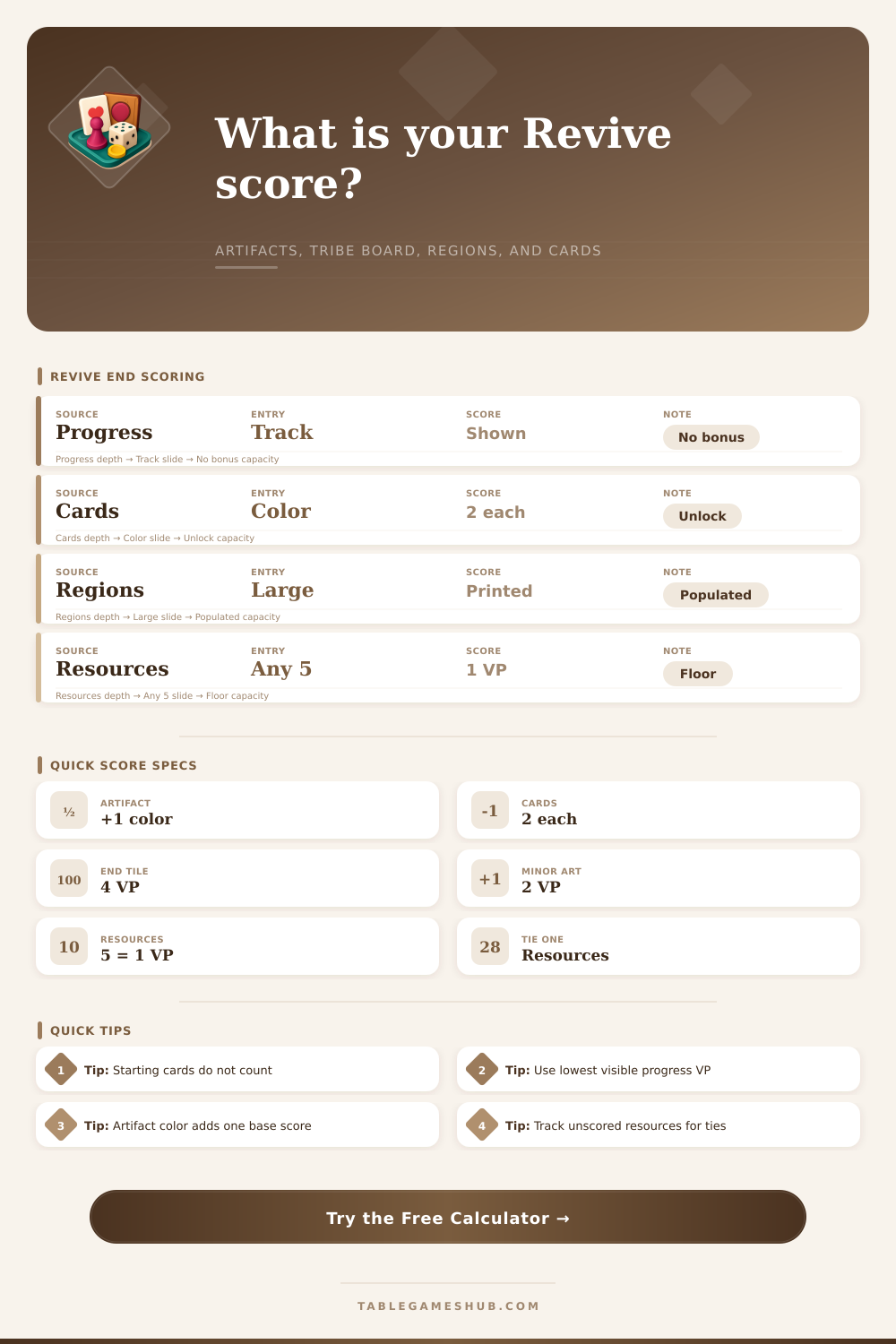
Do not include starting cards.
💎Artifact Card Multipliers
Yellow Artifact Row
Green Artifact Row
Gray Artifact Row
Each row scores as major artifacts of that color plus 1, multiplied by the matching artifact-card category and the VP value shown on the card.
🧮Tokens, Resources, and Tie Checks
Every full set of 5 remaining resources scores 1 VP.
Used after final score ties; it does not add VP.
📌Revive End Score Grid
📋Scoring Reference Tables
| Score Source | Calculator Input | Formula Used | End Scoring Note |
|---|---|---|---|
| Progress track | Lowest visible progress VP | Direct VP | Purple points do not trigger point-track bonuses. |
| Tribe board | Technology VP | Direct VP | Count only unlocked end-game technology values. |
| Population regions | Large locations by printed VP | Count x printed VP | Only populated large locations score here. |
| Machine card slots | Unlocked color bonus plus gained cards | 2 x gained cards | Starting cards are excluded from gained card counts. |
| Major artifacts | Artifacts, category count, VP per item | (Artifacts + 1) x count x VP | Repeat the artifact-card category once per artifact color. |
| Resources | Remaining resources | Floor(resources / 5) | Track leftover unscored resources for the first tie breaker. |
⚒Machine and Switch Track Guide
| Track Area | What to Enter | Scores Directly? | Why It Matters |
|---|---|---|---|
| Progress or switch track | Lowest visible VP and marker count | Yes | Visible VP is a final purple score category. |
| Gear machine track | Spaces advanced | No | Combined advancement is the second tie breaker. |
| Book machine track | Spaces advanced | No | Unlocks may add artifacts, progress markers, or card VP. |
| Food machine track | Spaces advanced | No | Use its color bonus only if the end-card slot is unlocked. |
💎Artifact Card Setup Examples
| Artifact Row | Example Category | Count Input | VP Input |
|---|---|---|---|
| Yellow artifacts | Energy, crates, or a shown icon | Total matching items | Printed VP per item |
| Green artifacts | Populated places or unlocked modules | Total matching items | Printed VP per item |
| Gray artifacts | Machines, switch markers, or cards | Total matching items | Printed VP per item |
| Common artifact card | Same card for all players | Your personal count | Same printed VP |
💡Scoring Tips
In the last round of Revive, the frantic engine-building slows down as you focus on scoring points toward winning the game. This is where all that work you put into placing your assets come together. Since it can be hard to remember these end-game triggers during the heat of battle, being able to easily add up your score are important. Did you needed those additional artifacts? Was that population more valuable then spending time elsewhere?
Instead of adding things up directly, categories with multipliers plays an outsized role in the system. Artifacts, especially major ones, drive a lot of that scoring power. But they don’t all get scored alone. There’s a multiplier per type of artifact based off how many you have of each. So having just a couple of something could double their value depending on base number. That’s what makes artifact collections so interesting. The calculator does all that math for you if you pop in your numbers. It’ll save you from any dumb mistakes you might make when there is multiple colors competing for your attention. Again, it doesn’t seem like much but accuracy matters when margins are thin. Be particularly mindful of card bonuses and machine slots.
How to Count Your Points
It’s easy to overlook that initial cards aren’t part of this victory point pool. Only cards obtained after starting through either market purchase or unlocking a slot are added to total. That difference can shift your total upwards by a few points, if you’re playing an engine that went deep into the expansion phase right away. The reference table on page spells it out nicely: the first column is pure direct point source; the second requires some sort of conditional input (such as an unlocked slot).
The other side of the coin are population regions, which offer a straightforward path to victory but demand spatial awareness. To that end, settlements will earn points equal to what’s printed on the tile, as long as it’s been populated. You’re trading off the benefit of settling high value tiles against holding back moves so you can gather artifacts later. You can put in how many of each type of tile you’ve settled (two point locations all the way up to the eight point heavy hitters). By breaking down the numbers, you’ll be able to see if you focused on quantity or quality when placing your settlements.
Finally, there’s that last-ditch lifeline: Resources. Every five leftover resources is worth one victory point. That might not sound like much. But when you’re running out and thinking about hoarding, this could of been a useful backup plan to help win tie-breakers later on. Your leftover count counts independently, so you know exactly how many points you have banked (and will lose) before your actual points are tallied. Unused resources matters most for tie-breaking, followed by progress on the machine track.
Beyond just the raw points number, there’s a set of tie breakers that give extra tension and twist to the game. Ties is broken by whoever has more unspent resources. Then ties after that get broken based off who advances their machines most. This part of the game gets overlooked till the last few turns, and then people fight about it or make decisions they wish they hadn’t. The built-in presets allows you to model various endgame scenarios: what if we rushed artifacts vs what if it was evenly matched? That way you know where seemingly minor choices affects the final outcome.
All this makes the end-game more of a strategic review than a math exercise, clarifying the connections between your different moves. It’s about understanding how efficient (or inefficient) each avenue was. It is not so much about counting points as it is seeing how efficient the whole campaign has been. If you’re leaving the table knowing exactly what you did right, or wrong; then that gives you a better idea going forward, making each game more deliberate and sharper.