Gaia Project Federation Calculator
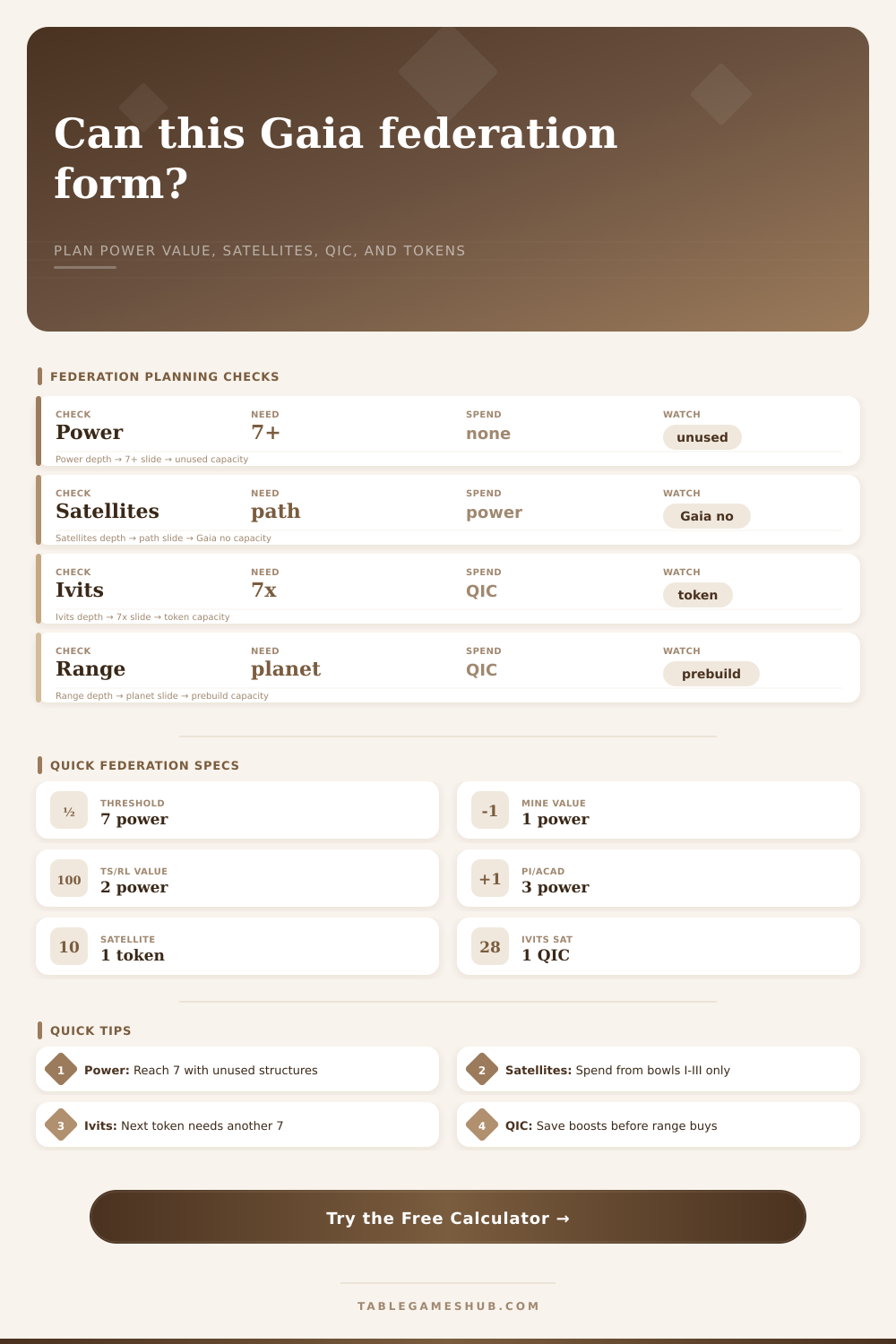
Plan whether a Gaia Project federation candidate reaches the required power value, pays the satellite path, preserves QIC for range, and lines up the federation token timing.
| Structure | Federation power value | Common use in a federation plan | Calculator input |
|---|---|---|---|
| Mine | 1 | Cheap map anchors that usually need help from upgrades. | Connected mines |
| Trading station | 2 | Efficient middle value; often turns a 5-value cluster into 7. | Connected trading stations |
| Research lab | 2 | Keeps a science route connected while still counting as 2 value. | Connected research labs |
| Planetary institute or academy | 3 | Large anchor that can reduce how many planets must be linked. | Connected PI and academies |
| Logistics item | Normal faction check | Ivits check | Planning note |
|---|---|---|---|
| Satellite placement | Discard 1 power token per satellite. | Spend 1 QIC per satellite. | Tokens in the Gaia area are not available for normal satellite payment. |
| Bridge count | Count empty spaces needed to connect planets. | Count the same path, but pay QIC. | Use the fewest legal satellites for the federation shape. |
| Range pressure | QIC may be reserved for pre-building a needed planet. | QIC must also cover satellites. | Spending QIC for range before forming can block an Ivits token. |
| Power timing | Bowls I, II, and III can supply discarded power. | Power stock is not the satellite limit. | Check Gaia-area commitments before counting spendable power. |
| Profile | Threshold used | Satellite currency | Scoring logistics |
|---|---|---|---|
| Standard faction | 7 power value in a new federation. | Discard power tokens. | Claim a green federation token, then keep or spend it later. |
| Ivits | 7 times the next token count in one expanding federation. | Spend QIC for satellites. | The calculator raises the threshold from 7 to 14, 21, or higher. |
| Xenos tempo | 7 power value per federation candidate. | Discard power tokens. | Prioritize timing when federation tokens unlock research or tech. |
| Gaia bridge factions | 7 power value after the key planet is built. | Depends on faction profile. | Plan QIC range before counting the final satellite payment. |
| Timing goal | Green token use | Gray token consequence | Calculator cue |
|---|---|---|---|
| Printed VP tempo | Claim the highest useful printed VP token available. | Still scores its printed value if later flipped. | Result card flags this as a scoring-ready plan. |
| Level 5 research gate | Keep one green token ready before taking the level 5 step. | Flip it when the research gate is paid. | Breakdown warns if satellite or QIC spend blocks the gate. |
| Advanced tech tile | Hold a green token until the tile action is available. | After flipping, it cannot pay another green-token requirement. | Use the token priority selector to preserve timing. |
| Final scoring pressure | More tokens can matter for federation final tiles. | Gray tokens remain counted as federation tokens at many tables. | Target step highlights whether this is token count or VP driven. |
Gaia Project can be frustrating. One reason for this is failed federation plans. They spend turns placing structures that increase power value, only to find they is not connected with enough satellites. Looks great on paper but in reality the cost was too much, the path wasn’t there.
Don’t do this to yourself. Plan ahead. Check to see if your candidate group qualifies before spending a turn. It does all the math for you. It asks how many structure you have and then spits out the answer without having to remember all those conversions and coefficients while under pressure during a turn.
Plan Your Federation Ahead of Time
But what about knowing why the numbers is important? Because that’s what ties your federation together: power value. In order to secure a token, you must has seven points of linked power. Seven. This is the minimum. From here, everything else depends upon where you sit on board and what faction you’re playing.
While a single mining station is cheap and offers a point of power value, a trading station or research lab will cost you more but offer two points. An Academy or Planetary Institute will give you three. You enter those into the calculator which adds them together accordingly. If you’re near the threshold but short on value, adding a mine won’t do much for you; replacing an existing building with a lab might make your plan possible. Quantity isn’t everything; it is also about quality.
Your planets connect with satellites, which cost resources. Here’s where lots of plans go wrong. Placing any satellite in your faction typically costs one power token for all factions except the Ivits who spend one QIC. Power tokens can be refilled when you use action bowls, while QIC is a limited resource (and serves as range boost as well). In short, if you’re playing Ivits, blowing your QIC on a satellite could mean not having the QIC needed to construct an important planet. The tool splits out this kind of logistic, letting you see the trade-off.
The second factor that the spreadsheet doesn’t account for is timing. Even with all of the satellites and power in your possession, maybe now isn’t the time to claim the green token. Maybe you’re saving up for the level 5 research gate, so why would you take the token green before you’re prepared to flip it? Scoring a few points today by taking the token early could cost you a future tech tile worth far more then a single point. By allowing you to choose your desired priority for each token, the calculator lets you map out this scenario. Does your strategy support long term access or an immediat score?
But it’s easy to make common errors by forgetting about state of the board. You think you have enough power, but then realize you don’t because you lack two power tokens when you actualy need three satellites along your route. And you might want to federate across a distance so great that you’ll have to use QIC which could leave you short on funds for other things. These limitations are spelled out in the tables on the page as a reminder that power only represents half of the picture; the other half is connectivity.
Deciding how to use resources is a puzzle of federation planning: how much do I spend on this structure? What about this one? How many satellites can I afford? Where does my fleet need to be able to reach? How many points do I get now versus later? That’s why you use the calculator. It spits out the numbers so that you can make the call.
What is it that I really want that token for? Check your resources, look at your board and answer that question. After that, it’s just arithmetic. You should of used it sooner.